
Change Your Suite Lock PIN Code
Section: Doors & AccessCategory: Manage AccessHow-to1 min read
Summary
Change your suite lock PIN from Manage Access in the Grata app, if your building and lock model support resident-managed PIN changes.
A suite lock PIN is used to unlock your suite door from the keypad. PIN rules may vary by lock model and building setup. Some buildings may not allow residents to change PINs directly — in those cases, contact property management.
If you are a co-resident, your PIN options may differ depending on your building and resident profile. Property management controls access permissions and whether PIN changes are available to residents.
You may need to stand near your unit lock after making a change so the updated PIN can sync to the keypad.
Step-by-Step Instructions
1Step 1: Open the Grata app
- Open the Grata app and sign in.
2Step 2: Open Manage Access
- From the home screen, tap Manage Access.
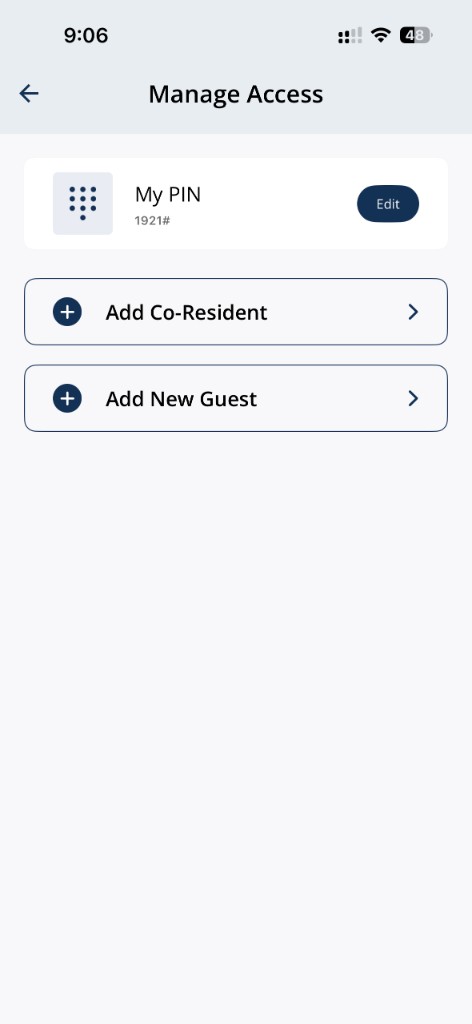
Tap Manage Access, then find My PIN on this screen.
3Step 3: Tap Edit beside My PIN
- Find My PIN (your suite lock PIN) and tap Edit.
4Step 4: Enter your new PIN
- Update Name if shown, then enter your new Code.
- Review the PIN rules on screen before you save.
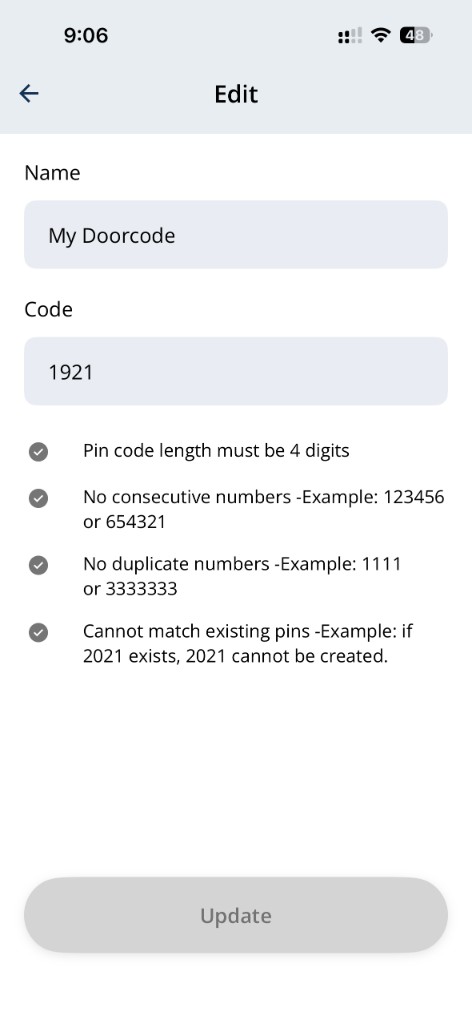
PIN rules may require 4 digits, no consecutive numbers, no duplicate digits.
5Step 5: Tap Update when the button is enabled to save your new PIN.
- Tap Update when the button is enabled to save your new PIN.
6Step 6: Stand near the lock if prompted
- Some buildings need your phone close to the lock so the updated PIN can program to the keypad.
- If you see Stand Next To Your Lock, move beside your suite door, then tap Confirm.
7Step 7: Test the new PIN at the door
- Wake the keypad, enter your new PIN, press , and confirm the lock responds before you rely on the code.
PIN rules (typical)
- PIN length must be 4 digits
- No consecutive numbers (for example 1234)
- No duplicate digits in the code
If PIN change is not available
- My PIN or Edit is missing from Manage Access.
- Update will not enable after you meet the on-screen rules.
- The app keeps asking you to stand near the lock but the PIN never syncs.
- The new PIN fails at the keypad after you followed the programming prompt.
Related articles
Lock or Unlock Door with a PIN Code
1 min read
Unlock your door with your PIN when your phone isn't an option — wake the keypad, enter your code, press #, an...
View or Find Your PIN Code
1 min read
Check your current door PIN from Manage Access — and create a new one if you've forgotten the old.
PIN Code Security
4 min read
Keep PIN access secure—keep your resident PIN private, use guest PINs for visitors, change your PIN when neede...
PIN Troubleshooting in the Grata App
4 min read
Fix common PIN issues—wrong codes, unresponsive keypads, missing My PIN, expired guest PINs, sync delays, and...