
PIN Code Security
Summary
PIN Security Best Practices▾
- Keep your personal PIN private.
- Do not share your resident PIN with guests, cleaners, dog walkers, contractors, or neighbours.
- Do not share your resident PIN with service providers — use guest access or guest PINs when available.
- Use Create Guest PIN or other approved guest tools from Manage Access instead of giving visitors your resident PIN.
- Avoid simple PINs such as 1234, 0000, repeated numbers, or obvious personal dates.
- Do not write your PIN somewhere visible or send it in group chats, email, or social media.
- Shield the keypad when entering your PIN if others are nearby.
- Update your PIN if you believe someone else may know it.
- Property management does not need your PIN — do not share it in support messages.
When to Change Your PIN▾
- Change your PIN if you shared it by mistake.
- Change your PIN if a guest or vendor used your personal PIN instead of guest access.
- Change your PIN when a roommate or co-resident situation changes.
- Change your PIN if you suspect someone else may know it.
- Change your PIN when the building or property management asks you to update it.
- Change your PIN if you want to improve account or access security.
How Guest PINs and Access Expiry Work▾
- Guest PINs are intended for temporary visitor access.
- Guest PINs may expire automatically when the access window ends.
- Guest PIN availability, access schedules, allowed doors, and expiry rules may vary by building.
- Remove old guest access when the visit ends if the app allows it — expired entries may remain visible until deleted.
- Do not use your personal resident PIN for temporary guests.
- Co-residents should use their own access credentials rather than sharing one resident PIN.
Troubleshooting Guide▾
- If your PIN may have been shared, change it in Manage Access if the app allows it.
- If you cannot change your PIN, confirm with property management whether resident PIN changes are enabled for your building and lock model.
- If guest access is still active after a visit, remove the guest PIN or guest access from Manage Access > Manage Guests if available.
- If a PIN does not work, open Manage Access > My PIN and confirm you are using the correct PIN. Wake the keypad before entering digits.
- If repeated incorrect attempts temporarily lock PIN entry at the keypad, wait several minutes before trying again with the confirmed PIN from Manage Access.
- If access permissions look wrong, property management may need to confirm your resident record and building setup.
- Do not share your personal resident PIN while waiting for a resolution.
- See PIN Troubleshooting in the Grata App for additional PIN and keypad checks.
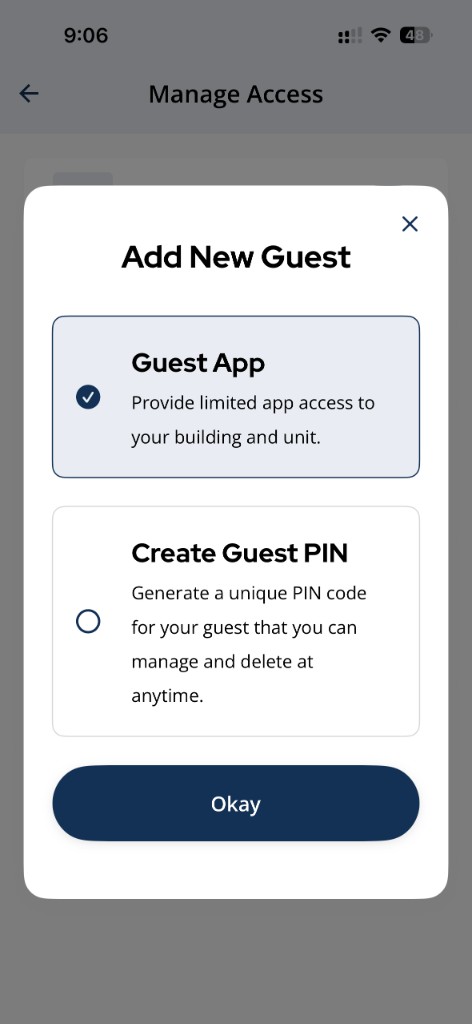
Use **Add New Guest > Create Guest PIN** or **Guest App** for visitor access instead of sharing your resident PIN.
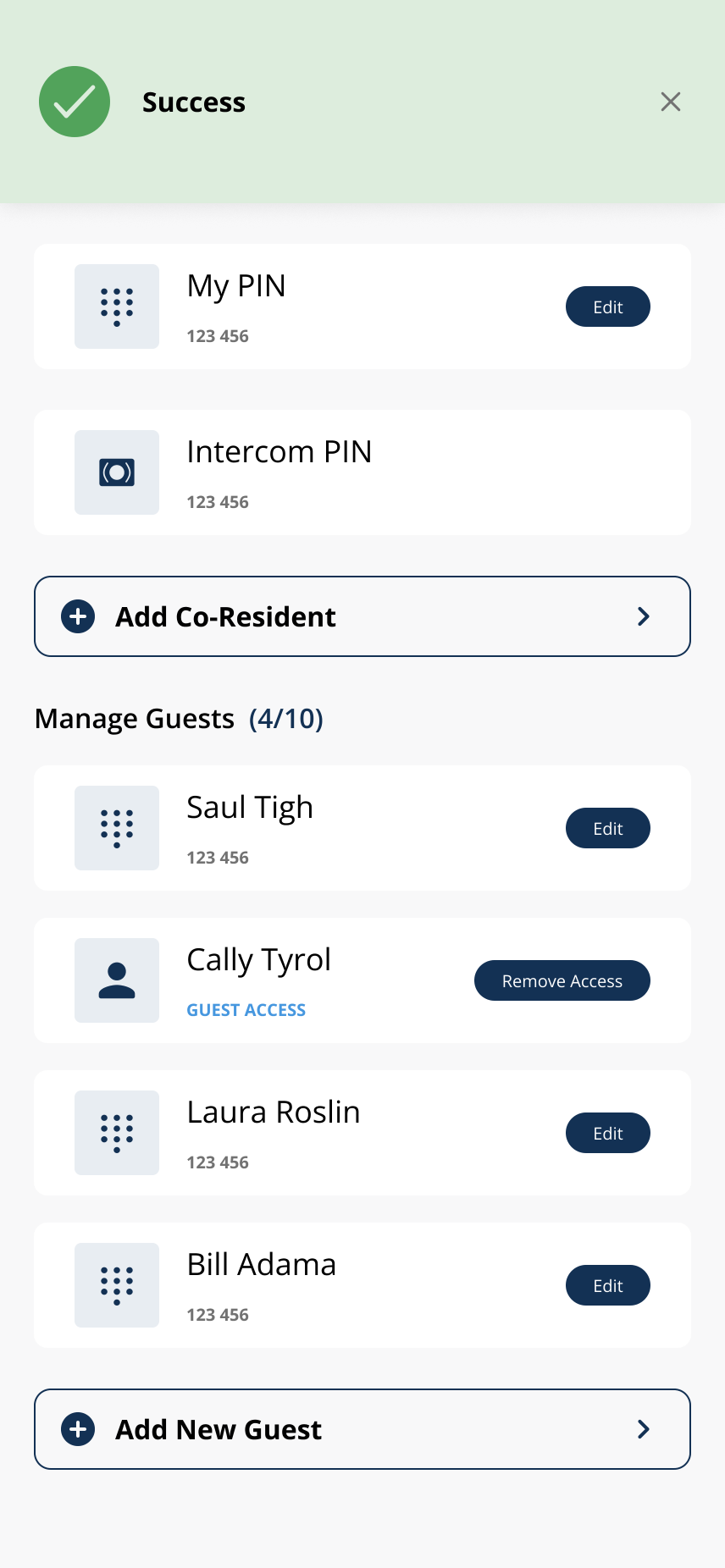
Confirm guest PIN creation succeeded, then share only with the intended visitor.
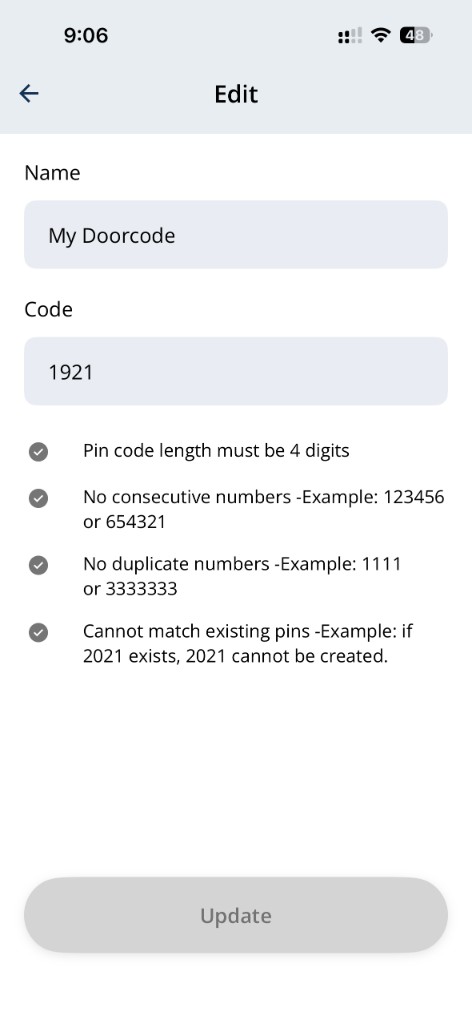
Example PIN validation rules on the **Edit My PIN** screen.
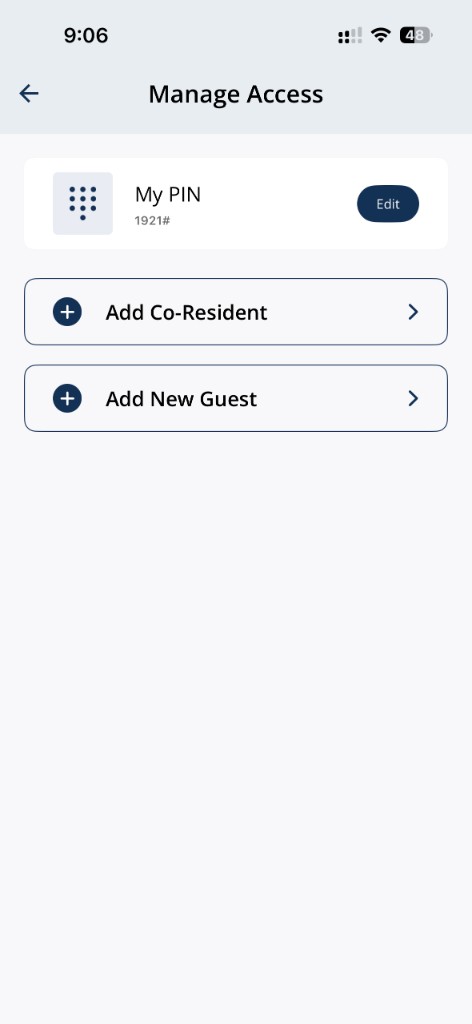
Open **Manage Access** to confirm your PIN and manage guest access.
Related articles
Lock or Unlock Door with a PIN Code
1 min read
Unlock your door with your PIN when your phone isn't an option — wake the keypad, enter your code, press #, an...
Who Controls My Access?
3 min read
Property management controls your access permissions — Grata reflects the building setup; contact your buildin...
Change Your Suite Lock PIN Code
1 min read
Change your suite lock PIN from Manage Access in the Grata Smart Living app. You may need to stand near your u...
PIN Troubleshooting in the Grata App
4 min read
Fix common PIN issues—wrong codes, unresponsive keypads, missing My PIN, expired guest PINs, sync delays, and...
Create a Guest PIN
1 min read
Create a named guest PIN from Manage Access > Add New Guest > Create Guest PIN.
Keep Your Access Information Private
4 min read
Treat your PIN, Digital Key, and guest credentials like house keys—use approved guest tools instead of sharing...
Report a Privacy or Access Concern
3 min read
If you notice suspicious access activity, an unexpected PIN or guest access issue, or a privacy concern in the...
Delete a Guest PIN
1 min read
Use this guide to set up, enter, or troubleshoot PIN-based door access.