
Guest PIN vs Guest App
Summary
Guest PIN▾
- A Guest PIN is a temporary or building-approved code created for a visitor.
- The guest can enter the PIN at supported locks or access points, depending on your building setup.
- It is useful when the guest does not need their own Grata app account.
- Guest PINs may have schedules, expiry dates, access limits, or allowed doors set by your building.
- Use guest PINs for visitors instead of sharing your personal resident PIN.
Guest App / Grata account access▾
- Guest App access means the guest may receive an invite to set up or use their own Grata guest account.
- This can allow app-based guest access where supported by your building.
- It may be useful for guests who need access for a longer period or who need access through app-based flows.
- The guest must follow the invite and setup instructions sent to them.
- Availability depends on your building's guest access configuration.
Which option should I use?▾
- Use Guest PIN for simple visitor access when a code is enough and your building supports guest PINs.
- Use Guest App / Grata account access when the guest should use app-based access and your building supports guest accounts.
- Use Co-Resident access instead of guest access for a longer-term household member when that is the right fit for your building.
- If an option is missing in Manage Access, property management may not have enabled it for your building or unit.
What may vary by building▾
- Not every building supports both Guest PIN and Guest App access.
- Guest access rules may vary by building, lock model, access-control setup, door type, schedule, and resident permissions.
- Property management controls guest access permissions, guest limits, and available access methods.
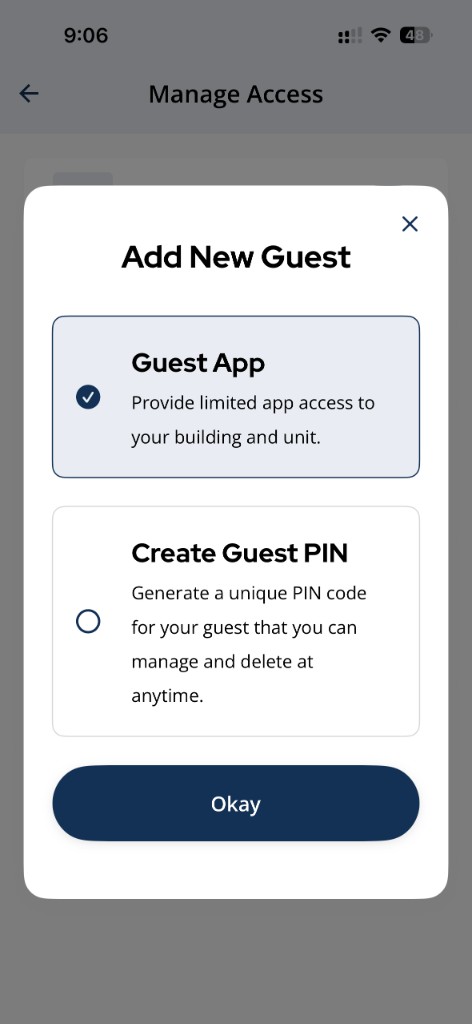
Tap **Manage Access > Add New Guest** to see which options your building has enabled.
Related articles
Add a New Guest in the Grata App
2 min read
From Manage Access, choose Guest App or Create Guest PIN when adding a new guest.
Create a Guest PIN
1 min read
Create a named guest PIN from Manage Access > Add New Guest > Create Guest PIN.
Edit Guest Access Dates or Times
1 min read
Adjust when a guest's access starts or ends — extend a visit, shorten it, or change the schedule entirely.
Add a Co-Resident in the Grata App
1 min read
Add a co-resident from Manage Access > Add Co-Resident with their contact details.
Set Up a Guest with a Grata Account
1 min read
Send a Guest App invite from Manage Access with the guest's name, email, and phone number.
Guest Limit Reached in the Grata App
1 min read
Some buildings cap active guests, guest PINs, or temporary access entries. Remove inactive guests under Manage...
Delete a Guest PIN
1 min read
Use this guide to set up, enter, or troubleshoot PIN-based door access.