
Open News Feed from the Mail Icon in Grata App
Section: Building Notices & News FeedCategory: News FeedHow-to1 min read
Summary
Tap the mail or envelope icon in the Grata app header to open the News Feed and view recent building announcements, notices, and updates. The News Feed may include maintenance schedules, amenity updates, parking notices, policy reminders, community announcements, or other messages from your property management team.
News Feed availability and message types may vary by building — property management controls which announcements are sent, who receives them, and how long they remain visible. The mail icon is the fastest path to the News Feed when it appears in your app.
Step-by-Step Instructions
1Step 1: Open the Grata app
- Open the Grata app on your phone.
2Step 2: Tap the mail icon from the home screen
- Look for the mail or envelope icon in the top header of the home screen.
- Tap it to open the News Feed.
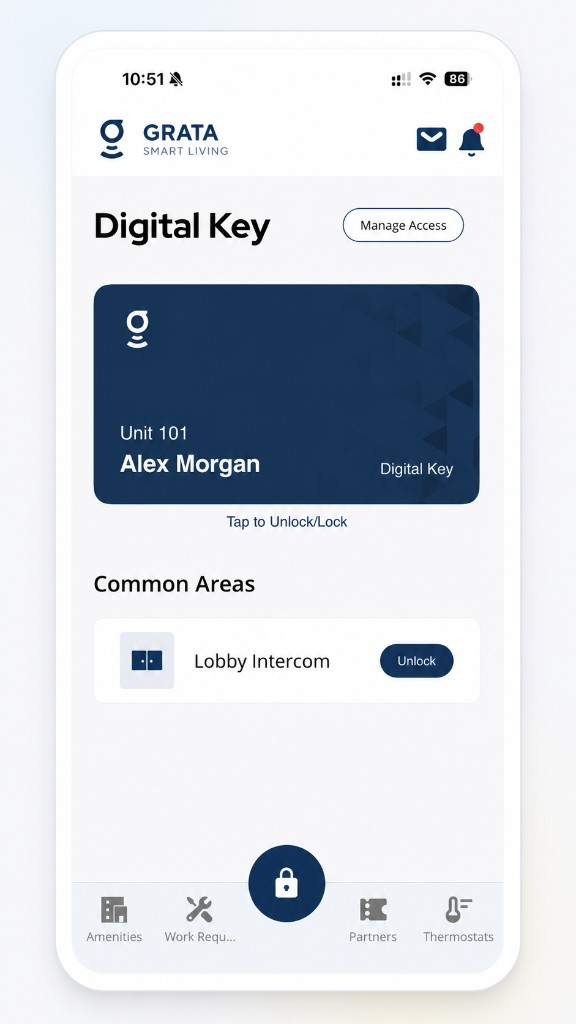
Tap the mail icon in the Grata app header to open the News Feed.
3Step 3: Review the News Feed list
- Scroll through announcements posted by your property team.
- Each item may show a title, sender, date, and short preview.
4Step 4: Tap an announcement to read the full details
- Tap any item to open the full message.
Related articles
Find Building Notices and Announcements
1 min read
Open Notifications for building announcements—tap a notice for details; if one is missing, check account, conn...
I Am Not Receiving Notifications
1 min read
Notifications stopped coming through? Walk through your phone settings, Grata's notification preferences, and...
Building Notices & News Feed Overview
1 min read
Find building announcements in News or the mail icon—and troubleshoot when the feed looks empty.
Open a Notification or Announcement Detail
1 min read
Tap a notification in the list to read the full detail page, then use the back arrow to return.