
App Shows the Wrong Building or Unit
Summary
Route 1: Check your profile
- Open Profile from the top-left icon on the home screen.
- Review your name, email, building, and unit details.
- Compare what the app shows to your lease or welcome email.
Route 2: Confirm you are using the correct email
- Some residents may have more than one email address.
- The app should be signed in with the email connected to your building's resident profile.
- If you are unsure, check your welcome email or contact your building team.
- If you signed in with the wrong email, sign out and sign back in with the correct one.
Route 3: Refresh your session
- Sign out of the app completely.
- Sign back in with the correct email.
- Close and reopen the app after signing in.
- Some display issues resolve after a fresh sign-in.
Route 4: What you can and cannot edit yourself
- Residents may be able to update some personal contact information (phone, email) from Profile.
- Building and unit assignments usually come from property records and cannot be changed by residents.
- If your building or unit is wrong, your building team needs to update it on their side.
- See Update Your Profile Information for fields you can change yourself.
When to contact property management
- Profile shows another resident's unit or a building you never lived in after signing out and back in.
- You moved units and the app never updated after the office said it would.
- Correcting contact info in the app did not fix access, deliveries, or notices.
- Other features (doors, amenities, work requests) are missing because of the wrong assignment.
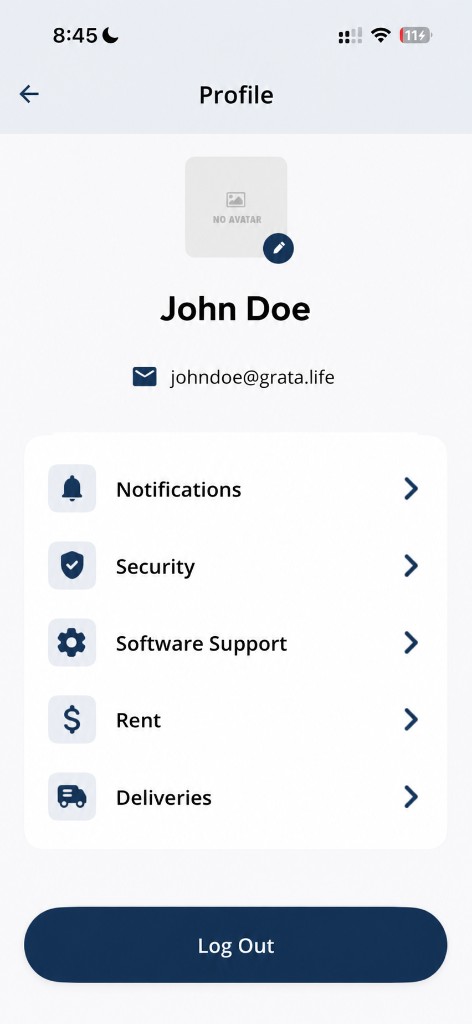
Open Profile to review your building, unit, and account details.
Related articles
First-Time Resident Setup
2 min read
Set up the Grata app for the first time: use your welcome invite, sign in, create your password, confirm your...
Sign In to the Grata App
1 min read
Sign in to Grata Smart Living with the email on your building profile and your password or temporary password.
Update Your Profile Information
1 min read
Open Profile from the home menu, tap the pencil on your profile photo under the Profile title to open Update P...
Feature Missing From the App
3 min read
If a feature is missing from the Grata Smart Living app, it is usually because your building has not enabled t...
Contact Property Management or Support
1 min read
Reach your property management team or Grata support straight from the app — Rudy AI, Email Support, or your b...