
Guest Did Not Receive Access
Section: Guest AccessCategory: TroubleshootingHow-to1 min read
Summary
If a guest did not receive an app invite, PIN, or instructions, confirm the guest entry in Manage Access, resend or fix details when the app allows it, and ask the guest to check spam and the correct email or phone before contacting your building.
Use this when a guest says they never received an invite or PIN, or when you need to confirm what was sent and whether you can resend access.
Step-by-Step Instructions
1Step 1: Start from the Grata Smart Living home screen
- From the Grata Smart Living home screen, tap Manage Access.
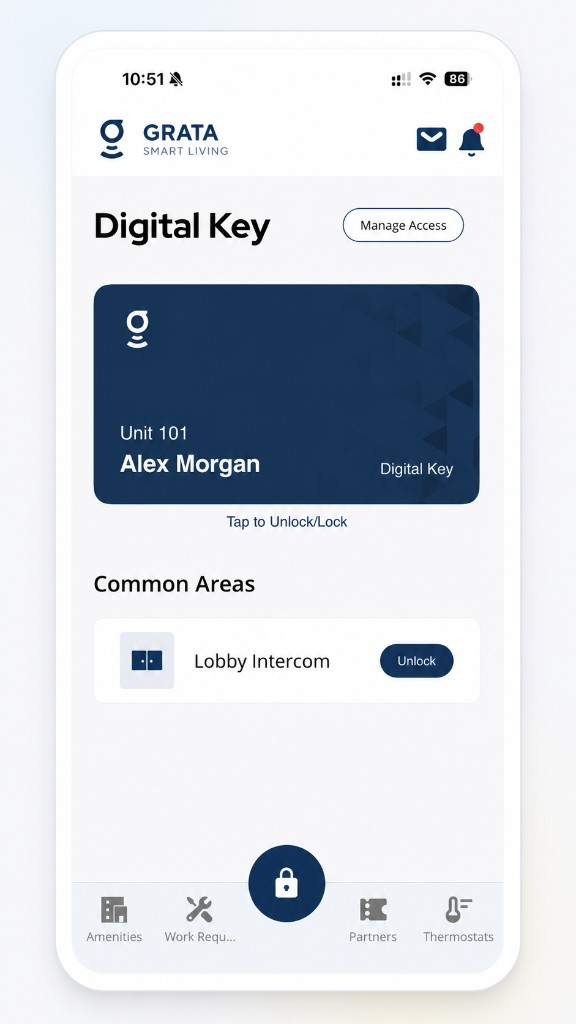
Start from the Grata Smart Living home screen.
2Step 2: Open the guest you invited
- Find the guest entry and check status, dates, and contact info for typos.
3Step 3: Resend or adjust if the app offers it
- Use Resend, Edit, or recreate the invite when your building allows changes.
4Step 4: Ask the guest to check spam and folders
- For email invites, ask them to search for Grata and check junk/promotions.
5Step 5: Coordinate a new path if nothing arrives
- Try another contact method your building accepts or ask the office to verify the guest record.
Important Notes
- Guest access rules, limits, and expiry are set by your building.
- Guest PINs and Guest App invites behave differently—use the path your property supports.
Contact Your Building’s Support
- The app will not send or resend guest access at all.
- The guest email or phone cannot be corrected in the app.
- Your building must enable guest access and it still does not appear for you.
Related articles
Grata App Overview
1 min read
Orientation to the Grata Smart Living app—access, bookings, requests, notices, devices, and what your building...
Sign In to the Grata App
1 min read
Sign in to Grata Smart Living with the email on your building profile and your password or temporary password.
Contact Property Management or Support
1 min read
Reach your property management team or Grata support straight from the app — Rudy AI, Email Support, or your b...