
View Your Intercom PIN
Section: Doors & AccessCategory: PIN CodesHow-to1 min read
Summary
Some buildings show a separate Intercom PIN on the Manage Access screen. It may differ from My PIN and is used only where your building has enabled intercom or entrance access.
Use this article when you need to find the intercom or entrance PIN your building assigned in the app. Not every building shows an Intercom PIN — if you do not see it, your building may use a different access method or this feature may not be enabled for your unit. The Intercom PIN is not the same as your app login password.
Step-by-Step Instructions
1Step 1: Start from the Grata Smart Living home screen
- From the Grata Smart Living home screen, tap Manage Access.
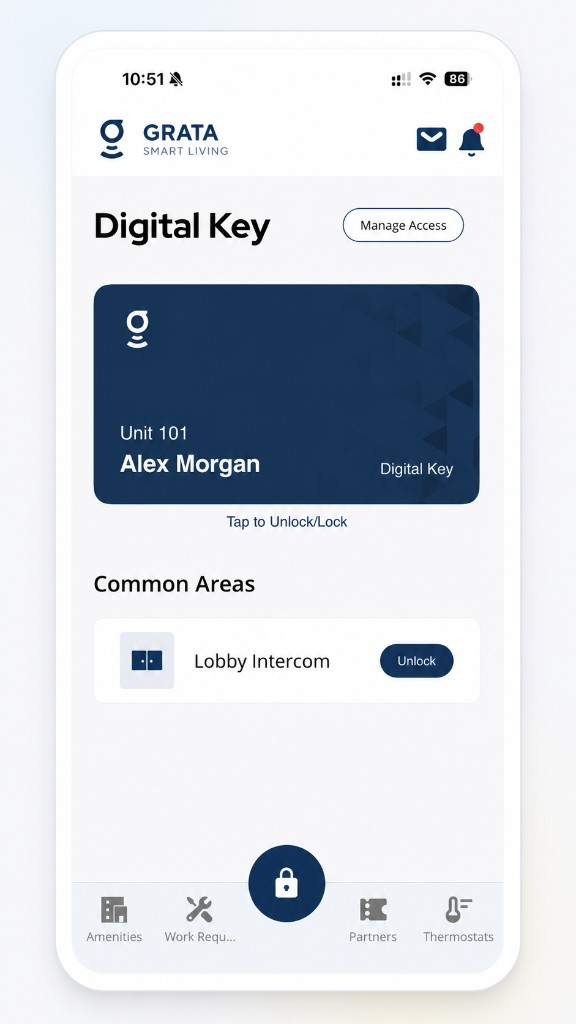
From the Grata Smart Living home screen, tap Manage Access.
2Step 2: Find Intercom PIN
- On the Manage Access screen, look for Intercom PIN beside My PIN when your building enables it.
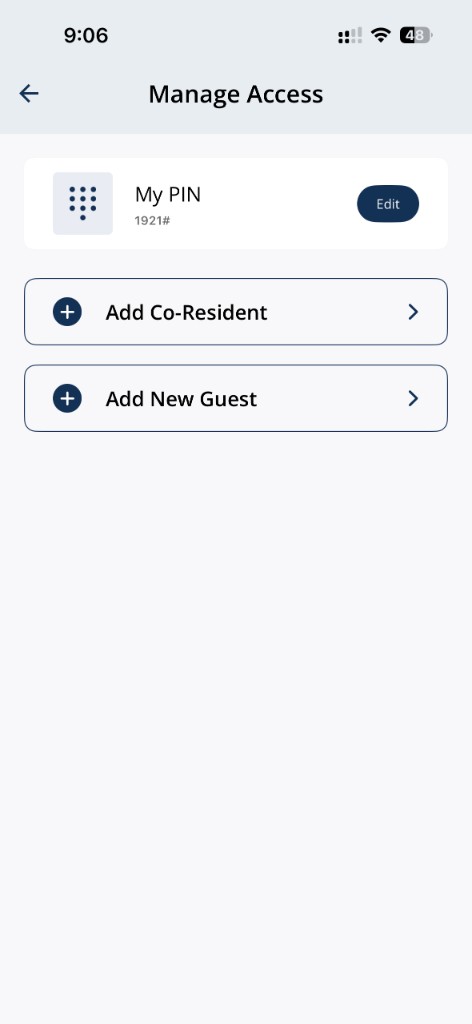
Manage Access showing My PIN; Intercom PIN appears on the same screen when your building enables it.
3Step 3: Use the PIN only as your building instructs
- Do not it with unauthorized people.
Important Notes
- Do not it with unauthorized people.
Related articles
Change Your Suite Lock PIN Code
1 min read
Change your suite lock PIN from Manage Access in the Grata Smart Living app. You may need to stand near your u...
PIN Code Security
4 min read
Keep PIN access secure—keep your resident PIN private, use guest PINs for visitors, change your PIN when neede...
Unlock Intercom and Common Area Doors with the Grata App
1 min read
Unlock lobby, intercom, elevator, and other shared doors from Common Areas—review LIVE entry screens when show...